Quick Picks
Short on time? Here are our top recommendations:
- Smart Light Switches – Best Overall — Best overall
- Smart Light Switches – Best Premium Choice — Best value
- Lutron Caseta Wireless Dimmer Switch – Best Overall — Best premium
- GE CYNC Smart Dimmer (No Neutral) – Best Budget Option — Best budget
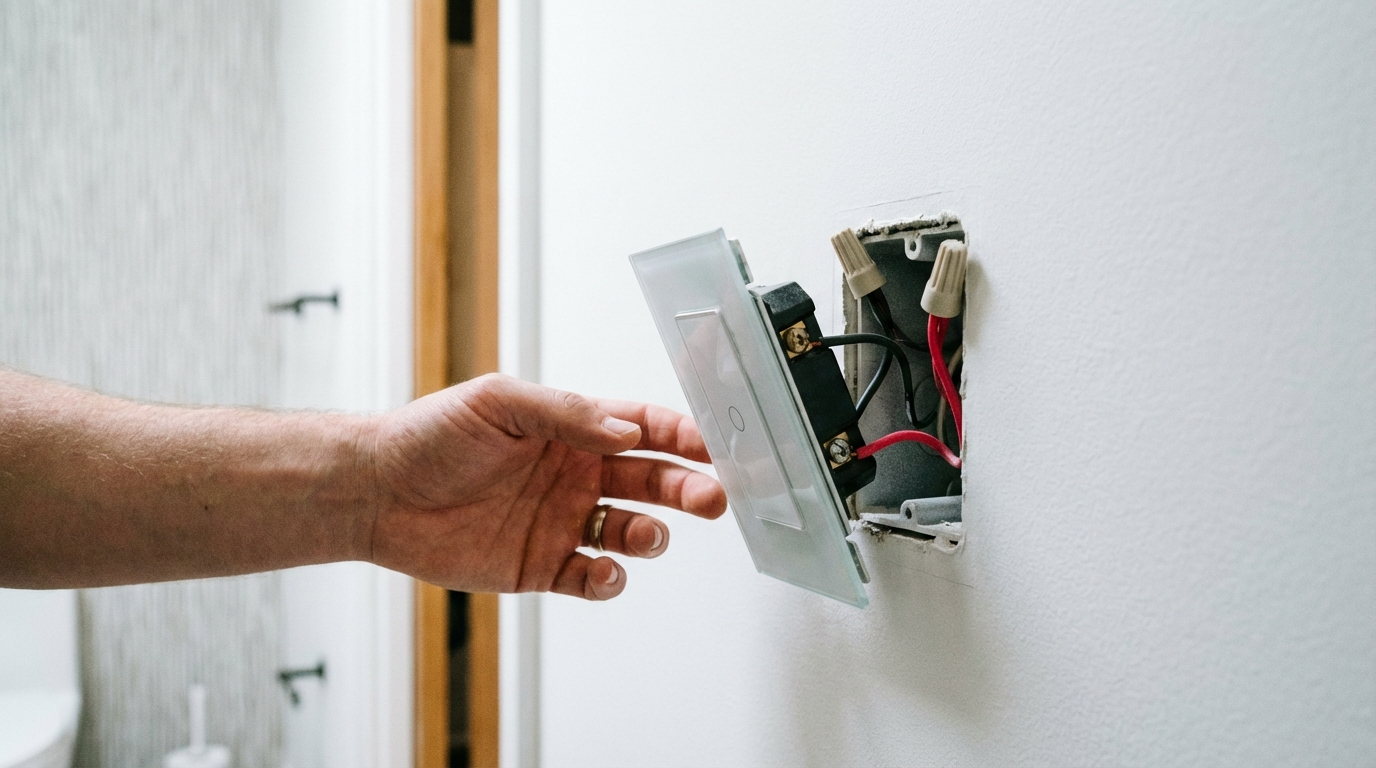
If you live in an older home built before the 1980s, there’s a good chance your light switch boxes don’t have a neutral wire. This single missing wire has probably frustrated your smart home dreams more than once. The good news? You don’t need to rewire your entire house to enjoy smart lighting.
No-neutral smart switches use clever technology to work with just the line, load, and ground wires already in your walls. They’re specifically designed for older homes where running new wiring would be expensive or impossible.
In this guide, we’ll walk you through the best smart light switches that don’t require a neutral wire, helping you transform your home’s lighting without the hassle and expense of rewiring. Whether you’re looking for voice control, dimming capabilities, or just remote access, there’s a solution that fits your needs and budget.
Our Product Picks
Smart Light Switches – Best Overall
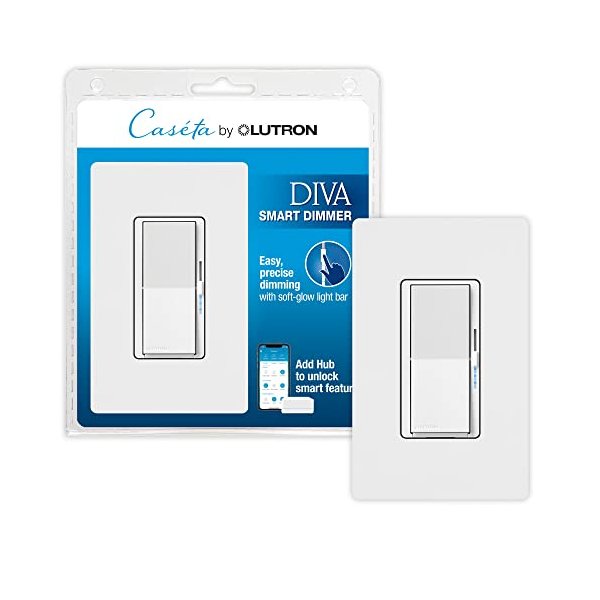
Lutron Caseta Wireless Dimmer Switch
The Lutron Caseta consistently ranks as the most reliable no-neutral option available. It works with virtually any bulb type, integrates seamlessly with major smart home platforms, and has earned a reputation for rock-solid performance that just works.
Key Features: – Works with Alexa, Google Assistant, Apple HomeKit, and SmartThings – Supports LEDs, CFLs, incandescent, and halogen bulbs (up to 150W) – Requires Lutron Smart Bridge hub for smart features – Professional-grade reliability with smooth dimming
View on Amazon | View on Manufacturer Site
Smart Light Switches – Best Budget Option
GE CYNC Smart Dimmer Switch (No Neutral)
GE’s CYNC line delivers solid smart lighting functionality at a fraction of premium prices. It doesn’t require a separate hub for basic features, making it perfect if you’re just starting your smart home journey.
Key Features: – Direct Wi-Fi connection (no hub required for basic functions) – Works with Alexa and Google Assistant – Supports LED and incandescent bulbs – Easy installation with clear instructions
View on Amazon | View on Manufacturer Site
Smart Light Switches – Best Premium Choice
Lutron Maestro Smart Dimmer
For those who want the absolute best dimming performance and integration options, the Maestro line offers premium features with Lutron’s legendary quality. It’s perfect for difficult lighting loads and demanding installations.
Key Features: – Advanced dimming technology for flicker-free operation – Works with any dimmable LED, CFL, incandescent, or halogen – Sleek design with multiple color options – Extended warranty and professional-grade components
View on Amazon | View on Manufacturer Site
Understanding the Neutral Wire Problem
Before we dive deeper into specific products, let’s clarify what you’re dealing with. A neutral wire is typically a white wire that provides a return path for electrical current. Modern electrical codes require it in switch boxes, but homes built before the 1980s often don’t have one.
Traditional smart switches need constant power to maintain their Wi-Fi or Zigbee connection, even when the lights are off. That’s where the neutral wire comes in—it completes the circuit. Without it, the switch would cut power to itself when you turn off the lights.
No-neutral switches solve this problem in two main ways: they either draw a tiny amount of power through the bulb itself (which is why bulb compatibility matters), or they use capacitors to maintain power. This is why choosing the right switch for your specific setup is crucial.
Top Smart Light Switches for Homes Without Neutral Wires
1. Lutron Caseta Wireless Dimmer Switch – Best Overall
According to thousands of user reviews and professional electrician recommendations, the Lutron Caseta system remains the gold standard for no-neutral installations. Lutron pioneered this technology decades ago, and their experience shows.
What makes it stand out: The Caseta works reliably with virtually any bulb type, including those finicky LED bulbs that cause other switches to flicker or buzz. The switch uses Lutron’s patented Clear Connect technology, which is more reliable than Wi-Fi or Zigbee in most homes.
Pros: – Exceptional bulb compatibility (works with 99% of dimmable LEDs) – No minimum load requirement – Butter-smooth dimming with no flicker – Rock-solid reliability – Works during internet outages (hub maintains local control) – Professional installation support available
Cons: – Requires the Smart Bridge hub ($79 separately or in starter kits) – More expensive than budget options – Proprietary wireless protocol (though this actually improves reliability) – Limited to 50 devices per hub
The Caseta system shines brightest when you’re converting multiple switches. Starter kits include the hub and two switches at a better price point than buying components separately.
View the Lutron Caseta on Amazon
2. GE CYNC Smart Dimmer (No Neutral) – Best Budget Option
If you’re budget-conscious or only need to convert one or two switches, the GE CYNC dimmer delivers impressive value. It connects directly to your Wi-Fi network, eliminating the need for an additional hub.
What makes it stand out: The CYNC line represents GE’s latest generation of smart switches, with improved Wi-Fi connectivity and better LED compatibility than their older C-by-GE models. The setup process takes about five minutes using the CYNC app.
Pros: – No hub required for basic functionality – Significantly cheaper than Lutron – Works with most common dimmable LED bulbs – Simple installation process – Voice control with Alexa and Google Assistant – Scheduling and automation features
Cons: – Requires strong Wi-Fi signal at switch location – Limited to 2.4GHz Wi-Fi networks – Occasional connectivity issues reported with router changes – May require minimum 25W load (depends on bulbs) – Not compatible with HomeKit
Based on user feedback, the CYNC performs best when paired with name-brand LED bulbs. Generic Amazon LEDs sometimes cause dimming issues or buzzing.
View the GE CYNC Switch on Amazon
3. Inovelli Blue Series Smart Switch – Best for Tech Enthusiasts
For smart home hobbyists who want maximum customization, the Inovelli Blue Series offers features you won’t find anywhere else. It uses Zigbee, works without a neutral wire, and includes a multi-color LED notification bar.
What makes it stand out: This switch is programmable to an almost ridiculous degree. You can customize button press patterns, LED colors and patterns, and create complex automations through Home Assistant, Hubitat, or SmartThings.
Pros: – Extensive customization options – Built-in multi-color LED bar for notifications – Scene control (different actions for single tap, double tap, hold) – Supports both smart and dumb bulbs – Local control through Zigbee hub – Active community support and firmware updates
Cons: – Requires Zigbee hub (like SmartThings, Hubitat, or Home Assistant) – Complex setup process (not beginner-friendly) – Higher price point – Occasional stock shortages – May not work well with all LED bulbs
The Inovelli shines when integrated with advanced home automation platforms. If you’re running Home Assistant or Hubitat, this switch unlocks possibilities that others can’t match.
View the Inovelli Blue Series on Amazon
4. TP-Link Kasa Smart Dimmer (No Neutral) – Best Wi-Fi Alternative

The TP-Link Kasa dimmer offers another hub-free option with a track record of reliability. TP-Link’s smart home ecosystem is well-developed, and their switches benefit from regular app updates and strong customer support.
What makes it stand out: Kasa switches work particularly well in homes with multiple TP-Link smart devices. The app allows you to group devices, create scenes, and set up schedules with an intuitive interface.
Pros: – No hub required – Reliable Wi-Fi connectivity – Excellent app interface – Works with Alexa, Google Assistant, and IFTTT – Responsive customer support – Competitive pricing
Cons: – No HomeKit support – Requires 2.4GHz Wi-Fi only – May have minimum load requirements – Bulkier than some competitors – Some users report app connection delays
According to user reviews, the Kasa dimmer works best with LED bulbs rated for dimming. Some users recommend staying above 35W total load for optimal performance.
View on Amazon | View on Manufacturer Site
5. Martin Jerry Smart Dimmer Switch – Best Ultra-Budget Option
For those on the tightest budgets, Martin Jerry switches offer basic smart functionality at bargain prices. While they lack the polish of premium options, they work adequately for simple on/off and dimming control.
What makes it stand out: These switches often cost less than half the price of name-brand alternatives. They’re a good choice for less-critical locations like closets, laundry rooms, or guest bedrooms.
Pros: – Extremely affordable – Works with Alexa and Google Assistant – No hub required – Simple setup process – Includes multiple face plate options
Cons: – Inconsistent quality control – Limited customer support – App interface is basic – May not work with all LED bulbs – No HomeKit compatibility – Shorter warranty period
User reviews suggest buying an extra switch or two, as quality control can be hit-or-miss. Many users report their switches working perfectly, while others receive defective units.
Installation Considerations
Installing a no-neutral smart switch is usually straightforward, but there are important things to know before you start. Always turn off power at the breaker before working with electrical wiring—this isn’t optional.
What You’ll Find in Your Switch Box
When you remove your existing switch, you’ll typically see three wires: a black wire (line/hot), another black or red wire (load), and a bare copper or green wire (ground). Some boxes may have a white wire bundled in the back—that’s likely a neutral, but it’s probably not connected to your switch.
If you find a white wire bundle: You might actually have a neutral wire available! Check if the white wires are wire-nutted together in the back of the box. If so, you may be able to use standard smart switches, which are often cheaper and more feature-rich.
Compatibility Requirements
Different switches have different requirements. Here’s what to check:
Minimum load: Some switches need at least 25-40W of total bulb wattage to function properly. If you’re controlling a single 9W LED bulb, it might not work. Check the switch specifications carefully.
Bulb type: Dimmable LED bulbs work best with most no-neutral dimmers. Regular (non-dimmable) LEDs may flicker, buzz, or fail to turn off completely. The switch manufacturer’s website usually lists compatible bulbs.
Maximum load: Don’t exceed the switch’s maximum wattage rating. Most handle 150W for LEDs, which translates to about fifteen 10W bulbs—plenty for most rooms.
Common Installation Issues
Flickering when off: This usually means your bulbs draw too little power. Try adding another fixture to the same switch, or switch to bulbs specifically rated as compatible with no-neutral dimmers.
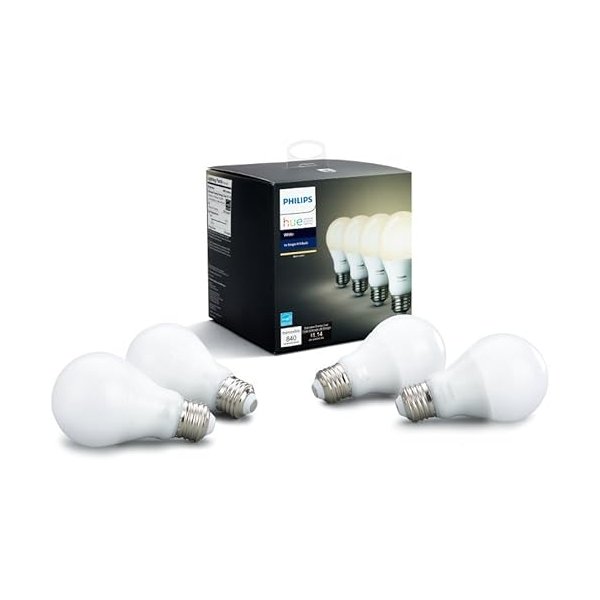
Buzzing sound: This indicates incompatibility between your switch and bulbs. Try different bulbs first—many no-neutral switches buzz with cheap LEDs but work perfectly with quality brands like Philips Hue White bulbs.
Switch won’t stay connected: Weak Wi-Fi signal is usually the culprit. Consider adding a Wi-Fi extender near the switch location, or choose a hub-based system like Lutron Caseta.
Hub vs. No-Hub: Which Should You Choose?
This is one of the most important decisions you’ll make. Both approaches have distinct advantages depending on your situation.
Hub-Based Systems (Like Lutron Caseta)
Hub-based systems require an additional device (the hub) that connects to your router and communicates with your switches. The hub then connects to the internet for voice control and remote access.
Advantages: – More reliable communication (dedicated wireless frequency) – Work during internet outages (local control maintained) – Better range in larger homes – Less congestion on your Wi-Fi network – Often better bulb compatibility
Disadvantages: – Additional upfront cost ($50-80 for hub) – One more device to plug in and maintain – Hub must stay connected to router
Hub systems make the most sense when you’re installing multiple smart switches. The improved reliability and performance justify the extra cost.
Wi-Fi Direct Systems (Like GE CYNC, TP-Link Kasa)
These switches connect directly to your Wi-Fi router without an intermediary hub. Setup is simpler—just connect to Wi-Fi like you would a smart speaker.
Advantages: – Lower initial cost (no hub to buy) – Simpler setup process – One less device to manage – Good for single-switch installations
Disadvantages: – Can clog your Wi-Fi network if you install many devices – Require good Wi-Fi coverage at each switch location – May stop working during internet outages – Can be affected by router changes or settings
Wi-Fi switches work great for one to three switches, especially if you have strong Wi-Fi coverage. Beyond that, hub systems often prove more reliable.
Smart Home Platform Compatibility
Make sure your chosen switch works with your existing (or planned) smart home ecosystem. Here’s how the major platforms stack up:
Amazon Alexa
Nearly all smart switches work with Alexa, making it the safest choice if voice control is important to you. Setup is straightforward—enable the skill, link your account, and discover devices.
Best for: Users who prioritize voice control and simple automation. Works great with Echo Dot speakers throughout your home.
Google Assistant
Google Home has slightly fewer compatible devices than Alexa, but all major brands are supported. The Google Home app offers good device grouping and routine features.
Best for: Android users and those who prefer Google’s natural language processing. Pairs well with Nest Hub displays.
Apple HomeKit
HomeKit compatibility is less common, especially for no-neutral switches. Lutron Caseta is one of the few reliable options. HomeKit offers better privacy and security but fewer device choices.
Best for: Privacy-conscious users invested in the Apple ecosystem who want local control through their HomePod or iPad.
SmartThings and Home Assistant
These platforms offer the most powerful automation capabilities but require more technical knowledge. Zigbee-based switches like Inovelli work particularly well.
Best for: Tech enthusiasts who want complex automations and don’t mind tinkering. You’ll need a SmartThings Hub or dedicated Home Assistant hardware.
Automation Ideas for Your Smart Switches
Once your switches are installed, you can create automations that genuinely improve daily life. Here are some popular setups based on user favorites:
Morning routine: Gradually brighten bedroom lights over 15 minutes starting before your alarm. This simulated sunrise helps you wake up naturally and improves morning mood.
Away mode: Randomly turn lights on and off when you’re traveling to simulate occupancy. This is one of the most effective deterrents against break-ins.
Movie time: Create a “movie scene” that dims living room lights to 20%, turns off overhead lights, and maybe adjusts your smart thermostat with a single voice command.
Bedtime: Schedule all lights to gradually dim starting at 9 PM, then turn off completely at 10 PM. You can override manually when needed, but the gentle reminder helps maintain healthy sleep schedules.
Motion integration: When paired with motion sensors like the Aqara, lights can turn on automatically when you enter a room and turn off when empty—genuinely convenient in hallways, bathrooms, and closets.
Cost Analysis: Is It Worth It?
Let’s break down the real costs of converting your home’s light switches, including some commonly overlooked expenses.
Basic Single Switch Setup
Budget option (GE CYNC): – Switch: $35-45 – Installation: DIY (free) or $75-150 professional – Total: $35-195
Premium option (Lutron Caseta): – Starter kit (hub + 2 switches): $120-140 – Additional switches: $50-60 each – Installation: DIY (free) or $75-150 professional per switch – Total: $120-290 for two switches
Whole Home Conversion (10 switches)
Budget route: – 10 Wi-Fi switches: $350-450 – Professional installation (recommended): $750-1,500 – Total: $1,100-1,950
Premium route: – Lutron Caseta starter + 8 additional switches: $520-620 – Professional installation: $750-1,500 – Total: $1,270-2,120
Compare to rewiring: Running neutral wires to 10 switch boxes typically costs $2,000-5,000 depending on your home’s layout. No-neutral switches pay for themselves if you’d otherwise need to rewire.
Troubleshooting Common Problems
Even the best switches occasionally act up. Here’s how to solve the most common issues based on user experiences:
Switch Won’t Connect to Wi-Fi
Solution steps:
- Ensure you’re using 2.4GHz Wi-Fi (most switches don’t support 5GHz)
- Move closer to your router during setup
- Turn off VPN on your phone during pairing
- Check if your router has MAC filtering enabled
- Try resetting the switch and starting over
Lights Flicker or Don’t Turn Off Completely
This usually indicates a compatibility problem: – Try name-brand dimmable LED bulbs – Ensure you’re meeting minimum load requirements – Some switches have a trimming feature in their app to adjust dimming range – Consider adding a dummy load resistor (electrician required)
Dimming Doesn’t Work Smoothly
Common causes: – Using non-dimmable bulbs with a dimmer switch – Mixed bulb types on the same switch (never mix LEDs with incandescent) – Low-quality LED bulbs – Switch trim settings need adjustment in the app
Solution: Replace all bulbs on the circuit with matching dimmable LEDs from reputable brands like Philips, GE, or Cree.
Remote Access Stopped Working
Check these: – Is your home internet working? – Did you change your Wi-Fi password recently? – For hub-based systems, is the hub still connected and powered on? – Try power cycling your router and hub – Check if the manufacturer’s servers are experiencing issues
Who Is This For?
No-neutral smart switches are perfect for:
Homeowners in older properties who want smart lighting without expensive rewiring. If your home was built before 1985, there’s a good chance you need these switches.
DIY enthusiasts with basic electrical knowledge who are comfortable working with home wiring. Installation requires turning off breakers and connecting wires, but it’s manageable for most handy homeowners.
Budget-conscious upgraders who want smart home features without the cost of hiring electricians to run new wiring throughout the house. These switches typically cost $30-80 compared to $200+ per location for rewiring.
Renters with permission to upgrade who want to take their switches with them when they move. These switches are completely reversible—just reinstall your original switches before moving out.
Smart home beginners looking for an entry point into home automation. Lighting control is one of the most immediately useful smart home features, and these switches deliver that experience without complex setup.
These switches might NOT be ideal for:
New construction or recently renovated homes that already have neutral wires—standard smart switches offer more features at lower prices when you have a neutral wire available.
Users who need dimming with very low wattage loads (a single 5W LED bulb) may experience compatibility issues with most no-neutral switches.
Frequently Asked Questions
Can I install a smart switch without a neutral wire myself?
Yes, if you have basic electrical knowledge and feel comfortable working with home wiring. The process is similar to installing a regular switch—turn off the breaker, remove the old switch, connect wires to the new switch according to the wiring diagram, and test. However, if you’re uncomfortable with electrical work or unsure about your wiring, hire a licensed electrician. The installation cost ($75-150) is worth it for safety and peace of mind.
Why do some smart switches need a neutral wire and others don’t?
Smart switches need continuous power to maintain Wi-Fi or Zigbee connectivity, even when the lights are off. With a neutral wire, electricity flows through the neutral and provides this constant power. No-neutral switches use clever engineering—they draw a tiny trickle of power through the bulb itself or use capacitors to maintain operation. This is why bulb compatibility is crucial with no-neutral switches.
Will no-neutral switches work with LED bulbs?
Most modern no-neutral switches work with LED bulbs, but compatibility varies by brand and model. Lutron Caseta has the best LED compatibility across all bulb brands. Budget switches may work with some LEDs but not others—user reviews often mention specific compatible bulbs. Always use dimmable LEDs with dimmer switches, and stick to name brands (Philips, GE, Cree) for best results. Some switches may require a minimum load of 25-40W total.
Do I need a hub for smart switches?
It depends on the switch. Wi-Fi-based switches (GE CYNC, TP-Link Kasa, Martin Jerry) connect directly to your router and don’t need a hub. Lutron Caseta requires its Smart Bridge hub. Zigbee switches (Inovelli) need a Zigbee hub like SmartThings or Hubitat. Hub-based systems are generally more reliable and work better in larger homes, while Wi-Fi switches cost less upfront and work fine for single installations.
What’s the best brand for smart switches without neutral wires?
Lutron Caseta is widely regarded as the gold standard based on reliability, bulb compatibility, and build quality. It’s the most expensive option but delivers rock-solid performance. For budget shoppers, GE CYNC offers good value with direct Wi-Fi connectivity. TP-Link Kasa falls in the middle ground with reliable performance at moderate prices. Your best choice depends on your budget, number of switches to install, and desired features.
Conclusion
Converting your older home to smart lighting doesn’t require expensive rewiring projects. No-neutral smart switches bring voice control, remote access, and automation to homes built before neutral wires were standard in switch boxes.
For most people, we recommend the Lutron Caseta system. Yes, it requires a hub and costs more upfront, but the reliability and universal bulb compatibility make it worth the investment. If you’re installing three or more switches, the Caseta starter kit delivers exceptional value.
On a tighter budget? The GE CYNC switches offer solid performance for $35-45 per switch with no hub required. They work well for single installations or if you only need to convert a few switches.
For advanced users with a home automation hub, the Inovelli Blue Series offers unmatched customization and features that justify their premium price.
Remember to check bulb compatibility, verify your wiring setup before ordering, and don’t hesitate to hire an electrician if you’re uncertain about installation. Smart lighting is one of the most satisfying smart home upgrades—you’ll wonder how you lived without it.
Looking to expand your smart home beyond lighting? Consider adding door sensors or security cameras to create a more comprehensive system.
Related Articles
- Best Smart Plugs for Lamps and Appliances – Add smart control to devices you can’t hardwire Learn More
- Smart Bulbs vs. Smart Switches: Which Is Right for You? – Understand the pros and cons of each approach Learn More
- Complete Home Automation Setup Guide for Beginners – Build your smart home step-by-step Learn More